
21 KiB
Keyman/Language Modelling layer
This document introduces the protocol for communicating between KeymanWeb and the language modeling layer (i.e., the configurable prediction and suggestion engine, (henceforth referred to as the "LMLayer").
Note: I'm using the term keyboard as a synonym for KeymanWeb.
The key words "MUST", "MUST NOT", "REQUIRED", "SHALL", "SHALL NOT", "SHOULD", "SHOULD NOT", "RECOMMENDED", "MAY", and "OPTIONAL" in this document are to be interpreted as described in RFC 2119.
Communication protocol between keyboard and asynchronous worker
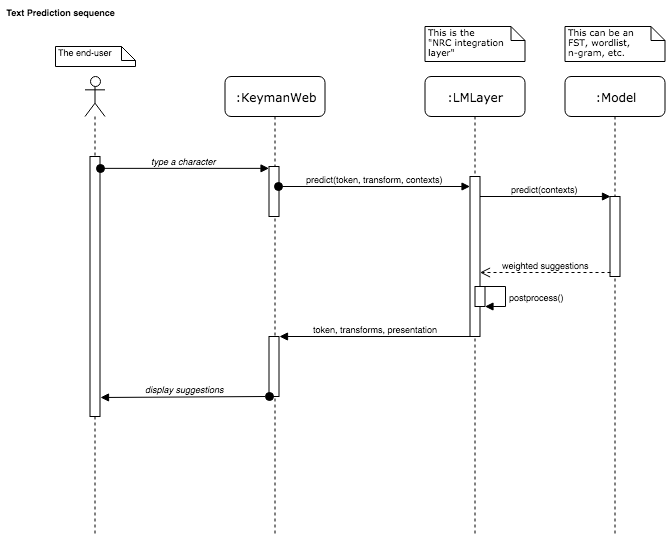
We have decided that everything to the right of the KeymanWeb will be
in a Web Worker. However, communication can happen only through
postMessage(data) commands,
where data is a serializable object (via the structured clone
algorithm).
What serializable object can we send that will adhere to the open-closed principle?
Messages
The idea is to use a discriminated union. The protocol involves
plain JavaScript objects with one property called message that takes
a finite set of string values.
These string values indicate what message should be sent. The rest of the properties in the object are the parameters send with the message.
{
    message: 'predict',
    // message-specific properties here
}
See also: XML-RPC
Messages are not methods. That is, there is no assumption that
a client will receive a reply when a message is sent. However, some
pairs of messages, such as predict and suggestions, assume
(non-blocking!) request/response semantics.
Tokens
Tokens uniquely identify an input event, such as a key press. Since Keyman should ask for an asynchronous prediction on most key presses, the token is intended to associate a prediction and its response with a particular input; Keyman is free to ignore prediction responses if they are for outdated input events.
The Token type is opaque to LMLayer. That is, LMLayer does not inspect
its contents; it simply uses it to identify a request and pass it back
to Keyman. There are a few requirements on the concrete type of the
Token:
- Tokens MUST be serializable via the structured clone algorithm;
- Tokens MUST be usable as a key in a
Mapobject. - Tokens MUST be unique across messages. That is, tokens MUST NOT be duplicated between different messages.
It is up to the keyboard to create unambiguous tokens that can be uniquely identified through the round-trip process.
In the following examples, I'll use the subset of number values that
are interpretable as 31-bit signed integers.
Example
An asynchronous message to predict after typing 'D':
{
    message: 'predict',

    token: 1,
    transform: {
        insert: 'D',
        deleteLeft: 0,
        deleteRight: 0
    },
    context: {
      left: '',
      right: '',
      startOfBuffer: true,
      endOfBuffer: true
    },
}
Message types
Currently there are a whole bunch of message types:
| Message | Direction | Parameters | Expected reply | Uses token |
|---|---|---|---|---|
config |
LMLayer → worker | capabilities | No | No |
load |
keyboard → LMLayer | model | Yes — ready |
No |
unload |
keyboard → LMLayer | none | No | No |
ready |
LMLayer → keyboard | configuration | No | No |
predict |
keyboard → LMLayer | transform, context | Yes — suggestions |
Yes |
suggestions |
LMLayer → keyboard | suggestions | No | Yes |
wordbreak |
LMLayer → worker | context | Yes - currentword |
Yes |
currentword |
LMLayer → keyboard | string | No | Yes |
accept |
keyboard → LMLayer | suggestion, | Yes - postaccept |
Yes |
| context, transform | ||||
postaccept |
LMLayer → keyboard | reversion | No | Yes |
revert |
keyboard → LMLayer | reversion, context | Yes - reversion |
Yes |
postrevert |
LMLayer → keyboard | suggestions | No | Yes |
reset-context |
keyboard → LMLayer | context | No | No |
Message: config
Must be sent from the keyboard to the LMLayer so that the LMLayer
may properly configure loaded models. It will send config, a plain
JavaScript object specifying platform restrictions.
The keyboard MUST NOT send any messages to the LMLayer prior to sending config.
After this, it is safe to assume the config was performed successfully and is ready to
load a model.
The LMLayer needs to know the platform's abilities and restrictions (capabilities).
interface ConfigMessage {
  message: 'load';

  /**
   * The path to the model's compiled script file.
   */
  capabilities: {
    /**
     * The maximum amount of UTF-16 code points that the keyboard will provide to
     * the left of the cursor, as an integer.
     */
    maxLeftContextCodePoints: number,

    /**
     * The maximum amount of code points that the keyboard will provide to the
     * right of the cursor, as an integer. The value 0 or the absence of this
     * rule implies that the right contexts are not supported.
     */
    maxRightContextCodePoints?: number,

    /**
     * Whether the platform supports deleting to the right. The absence of this
     * rule implies false.
     */
    supportsDeleteRight?: false,
  }
}
Message: load
Must be sent from the keyboard to the LMLayer so that the LMLayer
loads a model. It will send load which is a plain
JavaScript object specify the path to the model, as well configurations
and platform restrictions.
After a single config message, the keyboard MUST NOT send any messages
to the LMLayer prior to sending load. The keyboard SHOULD NOT send another
message to the keyboard until it receives ready message from the LMLayer
before sending another message.
The LMLayer needs to know which concrete language model to instantiate. This is provided
by the file at the path specified by the model string parameter.
interface LoadMessage {
  message: 'load';

  /**
   * The path to the model's compiled script file.
   */
  model: string
}
Message: unload
Must be sent from the keyboard to the LMLayer so that the LMLayer
resets itself in preparation for loading a new model. It will send unload
which is a plain message to trigger release of old model resources.
interface UnloadMessage {
  message: 'unload';
}
Message: ready
Must be sent from the LMLayer to the keyboard when the LMLayer's model
as a response to load. It will send configuration, which is
a plain JavaScript object requesting configuration from the keyboard.
There are only two options defined so far:
interface ReadyMessage {
  message: 'ready';
  configuration: {
    /**
     * How many UTF-16 code points maximum to send as the context to the
     * left of the cursor ("left" in the Unicode character stream).
     *
     * Affects the `context` property sent in `predict` messages.
     *
     * While the left context MUST NOT bisect surrogate pairs, they MAY
     * bisect graphical clusters.
     */
    leftContextCodePoints: number,

    /**
     * How many UTF-16 code points maximum to send as the context to the
     * right of the cursor ("right" in the Unicode character stream).
     *
     * Affects the `context` property sent in `predict` messages.
     *
     * While the left context MUST NOT bisect surrogate pairs, they MAY
     * bisect graphical clusters.
     */
    rightContextCodePoints: number,

    /**
     * Whether or not the model appends characters to Suggestions for
     * wordbreaking purposes.  (These characters need not be whitespace
     * or actual wordbreak characters.)
     */
    wordbreaksAfterSuggestions: boolean
  };
}
Message: predict
Sent from the keyboard to the LMLayer whenever a new prediction should
be generated. This is typically initiated by a key press event. The
keyboard SHOULD track each predict message using a token. The
token MUST be unique across all prediction events. The LMLayer
SHOULD respond to each predict message with a suggestions
message. The suggestions message MUST contain the corresponding
token as sent in the initial predict message.
The keyboard MUST send the context parameter. The keyboard
SHOULD send the transform parameter. The keyboard MUST send
a unique token.
The semantics of the predict message MUST be from the
perspective of this sequence of events:
- After the input event is received by the keyboard.
- Before the keyboard applies the associated
transformto the buffer.
NOTE: The keyboard MAY apply the transform associated with the
input event before receiving the corresponding suggestions message
from the LMLayer. The intention is that once the suggestions are displayed,
the typist may select one of the suggestions in the place of the effects
of their original input.
NOTE: The keyboard MAY send the predict message after it has
applied the transform associated with the input event to the buffer.
Regardless of the actual sequence, the semantics MUST remain the
same: the prediction happens from the perspective before the transform
has been applied. Therefore, if the keyboard eagerly transforms the
buffer before it has sent the predict message, it must anticipate
undoing the transform it has already applied should it apply a
transfrom sent in the suggestions message. The keyboard must act
as if it has never applied the transform associated with the input
event in the first place.
Context
The context is the text surrounding the insertion point, before the transform is applied to the buffer.
interface Context {
  /**
   * Up to maxLeftContextCodePoints code points of Unicode scalar value
   * (i. e., characters) to the left of the insertion point in the
   * buffer. If there is nothing to the left of the buffer, this returns
   * an empty string.
   */
  left: USVString;

  /**
   * Up to maxRightContextCodePoints code points of Unicode scalar value
   * (i. e., characters) to the right of the insertion point in the
   * buffer. If there is nothing to the right of the buffer, this returns
   * an empty string.
   */
  right?: USVString;

  /**
   * Whether the insertion point is at the start of the buffer.
   */
  startOfBuffer: boolean;

  /**
   * Whether the insertion point is at the end of the buffer.
   */
  endOfBuffer: boolean;
}
Transform
The transform parameter describes how the input event will change the buffer.
interface Transform {
  /**
   * The Unicode scalar values (i.e., characters) to be inserted at the
   * cursor position.
   *
   * Corresponds to `s` in com.keyman.KeyboardInterface.output.
   */
  insert: USVString;

  /**
   * The number of code points to delete to the left of the cursor.
   *
   * Corresponds to `dn` in com.keyman.KeyboardInterface.output.
   */
  deleteLeft: number;

  /**
   * The number of code points to delete to the right of the cursor.
   * Not available on all platforms.
   */
  deleteRight?: number;
}
Message: suggestions
The suggestions message is sent from the LMLayer to the keyboard. This
message sends a ranked array of suggestions, in descending order of
probability (i.e., entry 0 is most likely, followed by entry 1,
etc.). This message MUST be in response to a predict message, and
it MUST respond with the corresponding token.
/**
 * `suggestions` is an ordered array of suggestion objects.
 * Each suggestion is a transform bundled with a `displayAs` property.
 */
let suggestions = Suggestion[];

interface Suggestion {
  /**
   * Same object as an input event transform.
   * Note that the transform is applied AFTER the input event
   * transform.
   */
  transform: Transform;
  /**
   * A string to display the suggestion to the typist.
   * This should aid the typist understand what the transform
   * will do to their text.
   */
  displayAs: string;
}
let suggestions = [
  {
    transform: {
      insert: 'teapot',
      deleteLeft: 1,
      deleteRight: 0
    },
    displayAs: '🍵'
  }
];
Timing
Each suggestion provides a transform. This transform is applied
after the transform associated with the input event that initiated
this prediction. That is, the suggested transform applies to the buffer
after the transform associated with the input event.
Rephrased in somewhat mathematical terms: Let 𝑥 ∈ 𝐵 be the input text buffer. Let 𝑇𝑖 be the transform associated with an input event that maps a text buffer 𝐵 → 𝐵. Let 𝑇𝑠 be a transform suggested through the LMLayer. 𝑦 ∈ 𝐵 is the text buffer after the suggestion transform has been applied. The correct sequence of applications should be as follows:
𝑦 = 𝑇𝑠(𝑇𝑖(𝑥))
Late suggestions
Sometimes, a suggestions message may arrive after an input event has
already invalidated its request. This is called a "late" suggestion.
The LMLayer MAY send late suggestions. Consequently, the keyboard
MAY discard the late suggestions. There is no requirement for the
keyboard to acknowledge late suggestions, or for the LMLayer to avoid
sending late suggestions messages. In either case, a suggestions
message can be identified as appropriate or "late" via its token
property.
Message: wordbreak
Sent from the keyboard to the LMLayer to request a wordbreak operation
on the current context for use in its UI operations. (One useful
example: display text for a 'reversion' suggestion that undoes
previously-applied suggestions.) The keyboard SHOULD track each
wordbreak message using a token. The token MUST be unique
across all wordbreak events. The LMLayer SHOULD respond to each
wordbreak message with a currentword message. The wordbreak
message MUST contain the corresponding token as sent in the initial
wordbreak message.
The keyboard MUST send the context parameter. The keyboard MUST
send a unique token.
The semantics of the wordbreak message MUST be from the perspective
of this sequence of events:
- After any pending UI operations are completed, including application
of any selected suggestion's
transformto thecontext. - Before the user inputs any additional keystrokes.
Message: currentword
The currentword message is sent from the LMLayer to the keyboard. This
message sends the single word (as determined by wordbreaking) from
within context that begins to the left of the insertion point but
following the last wordbreaking character(s) to the left of the insertion
point. If no such wordform exists, this returns an empty string.
This message MUST be in response to a wordbreak message, and it
MUST respond with the corresponding token.
Message: accept
The accept message is sent from the keyboard to the LMLayer. This
message tells the LMLayer that a previously-returned suggestion
(from a predict-suggestions pair) has been accepted by the user.
The LMLayer SHOULD respond to each accept message with a
postaccept message providing a reversion capable of undoing it.
The keyboard MUST send the suggestion and context parameters.
The keyboard MUST send a unique token. The postTransform parameter is
optional, but highly suggested.
The semantics of the accept message MUST be from the perspective
of this sequence of events:
- A user has just selected the
suggestionas valid. - The keystroke triggering the
suggestionhas NOT been committed to thecontext. Its Transform data is sent as thepostTransformparameter. (The "post" nomenclature component signifies thatpostTransformcomes temporally "after" this context state.) - Before the user inputs any additional keystrokes, which would trigger new suggestions.
The postTransform parameter allows the base keystroke, which has NOT
been applied to the provided context, to be restored by the reversion
that undoes acceptance of the suggestion.
For reference, compare this to the "Message: predict" section
For Suggestions returned by a predict->suggestions message sequence:
predict'scontextthere should matchcontexthere.predict'stransformthere should matchpostTransformhere.- In the case that a distribution of Transforms was specified, rather than just one, only the 'base' keystroke's Transform should be used.
These serve as a snapshot in time of the state in which the Suggestion was generated.
Message: postaccept
The postaccept message is sent from the LMLayer to the keyboard. This
message sends a reversion capable of undoing acceptance of the suggestion
just accepted by the triggering accept message.
This message MUST be in response to a postaccept message, and it
MUST respond with the corresponding token.
Message: revert
The revert message is sent from the keyboard to the LMLayer.
The keyboard MUST send a reversion - the one previously returned by a
postaccept message in response to an accept message. This message tells
the predictive text engine to revert the engine's tracked context to the
original context parameter sent as part of that accept message.
The keyboard must also send the current context state, as it can be used
to determine the original context should the predictive engine have lost track
of the original state in the meantime.
Message: postrevert
The postrevert message is sent from the LMLayer to the keyboard. This
message sends an array of suggestions corresponding to the newly-restored
context requested by the revert message.
Message: reset-context
The reset-context message is sent from the keyboard to the LMLayer. This
message sends information on the new context to be used for prediction,
telling the predictive engine to disregard all previously-tracked information
that is context-dependent.
Examples
{
    message: 'wordbreak',

    token: 1,
    context: {
      left: 'The quick brown fox jumped',
      right: ' over the lazy dog',
      startOfBuffer: true,
      endOfBuffer: true
    },
}
would result in the following reply message:
{
    message: 'wordbreak',

    token: 1,
    word: 'jumped'
}
Alternatively, if the insertion point is after the space...
{
    message: 'wordbreak',

    token: 1,
    context: {
      left: 'The quick brown fox jumped ',
      right: 'over the lazy dog',
      startOfBuffer: true,
      endOfBuffer: true
    },
}
would result in the following reply message:
{
    message: 'wordbreak',

    token: 1,
    word: ''
}
The latter example returns empty string as the final pre-insertion point word preceeds the final pre-insertion point wordbreaking character.
Late responses
Sometimes, a currentword message may arrive after an input event or
other UI interaction has already invalidated its request. The LMLayer
MAY send late results. Consequently, the keyboard MAY discard
the late wordbreaking currentword result. This is no requirement for
the keyboard to acknowledge late wordbreaking results, or for the LMLayer
to avoid sending such late messages. In either case, a currentword message
can be identified as appropriate or "late" via its token property.
Informative: LMLayer worker as a state machine
The LMLayer worker can be seen in the following states:
unconfiguredmodel-lessready
The transitions of this diagram correspond to messages as described above.
